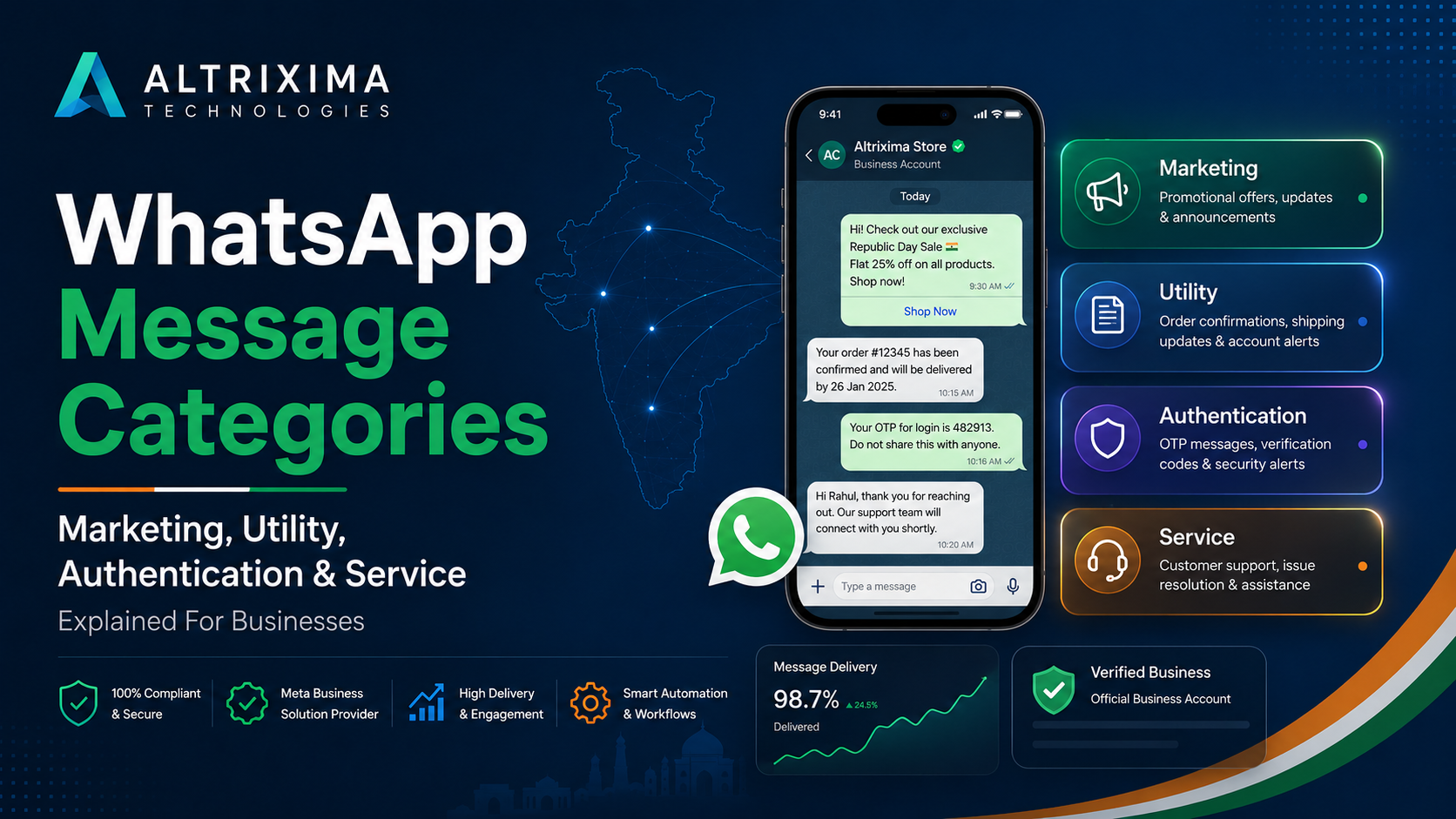
Businesses using the WhatsApp Business Platform cannot treat every outgoing message the same way. Meta separates business communication into four WhatsApp message categories: marketing, utility, authentication and service. The category affects the purpose of the message, when it can be sent and how Meta charges for delivery.
For Indian businesses using WhatsApp API, knowing the difference can help reduce template rejections, control messaging costs and keep customer communication relevant.
What Are WhatsApp Message Categories?
WhatsApp message categories are classifications used by Meta to identify why a business is contacting a customer. Meta currently charges eligible business messages when they are delivered, and rates vary by the recipient’s market and the message category. Service messages are not charged. Utility messages sent in response to a user are also not charged under the current pricing structure.
1. WhatsApp Marketing Messages
Marketing messages promote a product, service, offer or business. They can support sales, lead nurturing and customer re-engagement.
Examples include:
- Festival or seasonal offers
- New product announcements
- Discount codes
- Abandoned-cart reminders
- Membership renewal offers
- Product or service recommendations
A message does not need to contain the word “sale” to be classed as marketing. A template that encourages a new purchase, promotes an upgrade or tries to bring an inactive customer back will usually fit this category.
Businesses should collect clear customer opt-in before sending promotional WhatsApp messages. Meta also reviews business-initiated templates and may restrict accounts that repeatedly send unwanted or poor-quality communication.
Keep campaigns relevant. A smaller, well-targeted list is usually better than sending the same offer to every saved contact.
2. WhatsApp Utility Messages
Utility messages provide information connected to an order, booking, account or service the customer has already requested.
Examples include:
- Order confirmations
- Shipping and delivery updates
- Appointment confirmations
- Payment receipts
- Booking reminders
- Account alerts
- Subscription changes
The main test is intent. A utility message should help the customer understand or complete an existing transaction. Meta describes utility messages as non-promotional communication that is specific to, or requested by, a customer.
For example, “Your appointment is confirmed for Monday at 11:00 AM” is a utility message. Adding “Book another consultation today and receive 20% off” introduces promotional content and may cause the template to be treated as marketing.
Keep utility templates focused. Do not mix a necessary update with an offer simply to reduce messaging charges.
3. WhatsApp Authentication Messages
Authentication messages verify a person’s identity through one-time passwords, usually called OTPs.
Businesses can use them for:
- New account registration
- Login verification
- Password recovery
- Payment confirmation
- Transaction approval
- Delivery verification
WhatsApp authentication templates may support one-tap, autofill or zero-tap verification, depending on the user’s device and the business setup.
These messages should contain only what is required for verification. Offers, product suggestions and general account updates do not belong in an authentication template.
Security matters. Set sensible code-expiry periods, avoid exposing unnecessary personal information and never ask customers to share an OTP with staff.
4. WhatsApp Service Messages
Service messages are replies sent after a customer contacts the business.
When a user sends a message, a 24-hour customer service window opens. During that time, the business can send free-form service replies instead of an approved template. The window resets whenever the customer sends another message.
Service conversations can include:
- Answering product questions
- Resolving complaints
- Helping with an order
- Sharing requested information
- Booking an appointment
- Providing after-sales support
Once the 24-hour window closes, a business generally needs an approved template to restart the conversation.
A shared WhatsApp team inbox helps here. Staff can see conversation history, assign chats, add notes and respond before the window expires.
How Should You Choose the Correct Category?
Start with one question: why is this message being sent?
Use marketing for promotion, sales or re-engagement. Choose utility for an existing transaction or customer request. Select authentication for OTPs and identity checks. Use service for replies inside the open customer service window.
Do not select a category only because it is cheaper. The message content should match its stated purpose.
Why WhatsApp Message Categories Matter
Correct classification helps Indian businesses plan WhatsApp API pricing, submit suitable templates and send messages customers expect.
It also keeps automation cleaner. A clinic may use utility messages for appointment reminders, a retailer may use marketing templates for a festive offer, and a software company may use authentication messages for login codes. Customer questions can then be handled as service messages.
Altrixima Connect helps businesses manage WhatsApp templates, campaigns, shared inbox conversations, CRM follow-ups and automation from one platform. Each message can be planned around its actual purpose instead of being treated as a generic broadcast.